creeeeezy
V2EX  ›  Apple

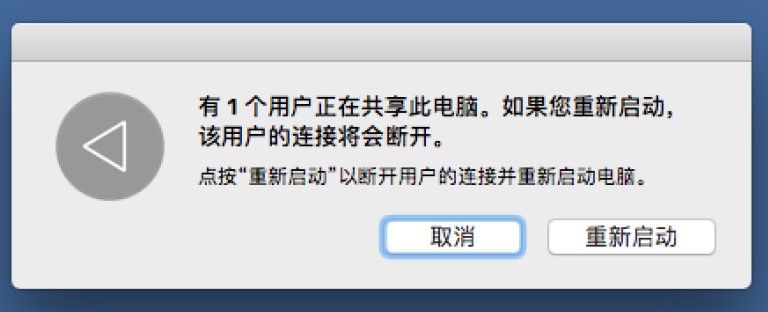
macOS 有 1 个用户正在共享此电脑

  •  
  •   creeeeezy · May 11, 2024 · 2060 views
    This topic created in 761 days ago, the information mentioned may be changed or developed.

    请教各位。每次重启的时候都会提示“有 1 个用户正在共享此电脑”,要怎么能查看是哪个用户在共享?有没有办法直接重启不要提示?
    https://ossk.cc/file/d521cfb03460000104f69.jpg

    5 replies    2024-06-08 11:37:16 +08:00
    NekoNeko666
        1
    NekoNeko666  
       May 11, 2024 via iPhone
    可以用命令行或者 Apple Script 跳过:参考 https://www.macscripter.net/t/shut-down-with-user-sharing-this-computer-dialog/74597

    https://apple.stackexchange.com/questions/75772/disable-warning-there-is-a-user-sharing-this-computer

    一般情况下可以在 Terminal 中用一些命令查看谁登陆了:

    last
    last | grep "logged in"
    who
    duolaamengv2
        2
    duolaamengv2  
       May 12, 2024
    你这个提示有点惊悚
    gogocome
        3
    gogocome  
       May 13, 2024
    我这两天重启也出现这个了
    是最近才有的吗
    creeeeezy
        4
    creeeeezy  
    OP
       Jun 8, 2024
    @gogocome 是最近才有的
    creeeeezy
        5
    creeeeezy  
    OP
       Jun 8, 2024
    @NekoNeko666 我输入 who 命令,也只有两个都是我自己。一个是 console 登陆,一个是 ttys000 登陆。
    About   ·   Help   ·   Advertise   ·   Blog   ·   API   ·   FAQ   ·   Solana   ·   3287 Online   Highest 6679   ·     Select Language
    创意工作者们的社区
    World is powered by solitude
    VERSION: 3.9.8.5 · 33ms · UTC 11:08 · PVG 19:08 · LAX 04:08 · JFK 07:08
    ♥ Do have faith in what you're doing.
